How to update Audi MMI 3G Plus / High / Basic / firmware
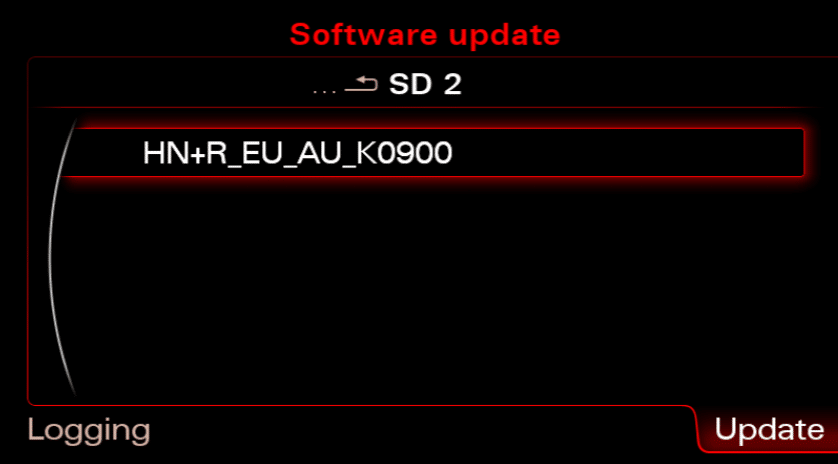
Table of content
- How to get the firmware?
- What's My MMI version?
- How to unpack files & prepare SD CARD?
- How to update my firmware?
- What if I got Bose / Bang Olufsen audio system?
- How to enable User Defined mode?
- Google Earth / Audi Connect - has stop working after update.
- Audi RSE - Rear Seat Entertainment - how to update?
- COMMON ERRORS LIST AND EXPLANATION.
Stop wasting time on map updates that are no longer supported. Give your Audi MMI 3G, 3G+ or 3G Basic system a new lease on life. Get full, high-res smartphone integration without losing any of your original car features.
🛒 Check Compatibility & Buy the Module Here →How to get the firmware and what’s my MMI version?
Without firmware you can’t update your MMI, it’s also quite important when you want to update maps - it will not be working without latest firmware!
If you know what type of MMI you have, you can jump straight to the installation manual (click here to get there).
First of all, you have to recognise which MMI is in your car.
The best way is just to go to the Engineering menu and check the current firmware version.
You can enter there by pressing the CAR and SETUP (or sometimes MENUor BACK) buttons on your MMI console.
This video might be useful


When you are in red engineering menu, you will see screen like above.
Most Trans it’s your current MMI version.
There are different MMIs, so before purchasing make sure you are getting right software for right MMI.

What’s my MMI?
When you are already in Engineering Menu you can now recognise your MMI, so:
- MMI 2G: SW: XX-XX XX.X.X XXXX
- MMI 3G Low/Basic: BNav_XX_XXXXX
- MMI 3G High: HNav_XX_XXXXX
- MMI 3G+: HN+_XX_XXXXX or HN+R
- MMI RMC: RMC_XX_XXXXX
About MMI 3G Plus
You might have HN+ or HN+R, the difference between them it’s that they have been installed in different cars.
- MMI 3G PLUS with firmware starting from HN+ has been installed in Audi A4/A5/Q5/Q7.
- MMI 3G PLUS with firmware starting from HN+R has been installed in Audi A6/A7/A8/Q3
Is it important to get correct software, because if you for example choose HN+ for Audi A6 it will not working.

When you know what Audi MMi you have, you can now buy firmware from our website:
This guide covers firmware installation for MMI 3G systems. For help identifying the correct software family across Audi MMI generations, read our Audi MMI software version guide.
🚀 Moving Beyond MMI 3G?
Official map updates for legacy MMI 3G systems concluded in 2024. If you are looking for modern navigation, real-time traffic, and full smartphone integration, it is time to explore next-generation alternatives!
Driving a newer Audi model? Discover how to fully unlock and activate Apple CarPlay, Android Auto, and custom firmware on high-performance MIB2 (MHI2 & MHI2q) systems.
PLEASE BE AWARE! DOWNLOADED FIRMWARE / MAPS FROM TORRENTS OR OTHER UNKNOWN SOURCE MIGHT BRICK YOUR MMI. WE ARE SELLING ONLY GENUINE SOFT & MAPS FROM AUDI GARAGE!


How to prepare SDCARDs?
When you have bought the firmware and already downloaded them, you have to unzip and copy on to root folder of SD CARD.
Extract downloaded files - how to do? Click here - there's a complete guide how to deal with downloaded files.
IF YOU HAVE BOUGHT BUNDLE PACK! DO NOT COPY FIRMWARE FILES WITH MAPS FILES AND ACTIVATOR ON THE SAME SDCARD. EVERY UPDATE MUST BE DONE SEPARATELY!
ADAM
When you have already unpacked the files with firmware go inside newly created folder and you will see something like on the screenshot bellow.
Keep in mind the file list might be different for EU and USA / Canada so do not count the files etc. for example like this

and copy all of those files directly on to SDCARD, without parent folder like HN+_xxxxx

IMPORTANT: PLEASE DO NOT USE MACOS TO COPY THE FILES. MACOS CREATING LOTS OF HIDDEN FILES AND MMI CAN BE LITTLE BIT CONFUSED AND DISPLAY ERROR. SD CARD MUST BE FORMATTED AS FAT32!
How to install firmware update?
Open “Engineering Menu” by pressing CAR button and immediately after BACK button. Hold booth buttons pressed for a few seconds.
The following screen will appear.
NOTE! EVERY UPDATE MUST BE PERFORMED FROM RED ENGINEERING MENU. IT WILL DOESN'T WORK FROM OTHER MENU. IF YOU HAVE TROUBLE TO GET THERE, WAIT AROUND 5 MINUTES AFTER STARTING CAR, AND TRY AGAIN BY BELLOW KEYS COMBINATIONS WHICH MUST BE PRESSED TOGETHER.
ADAM
Insert the SD card with the firmware in to SD 1
Press the “Update” option using the MMI Control Panel.

Scroll down with the big knob and select the source in the menu (SD 1)

Select the firmware by pressing the big knob once

And on the next window select “Standard”
What if I got Bose / Bang Olufsen audio system?
Or you can use the fibre optic loop adapter, you can buy one here!
PLEASE AWARE!!!!! FOR MIB units you need to use this optic loop!! on Mib you can't use hidden green menu as there's no option to enable it.
If you have Mib1 / Mib2 / RMC and bose or B&O, you must use this fibre optic loop adapter, otherwise bose system will stop working properly!!

Or you can deselect BOSE module to update in User-defined mode
How to enable User Defined mode?
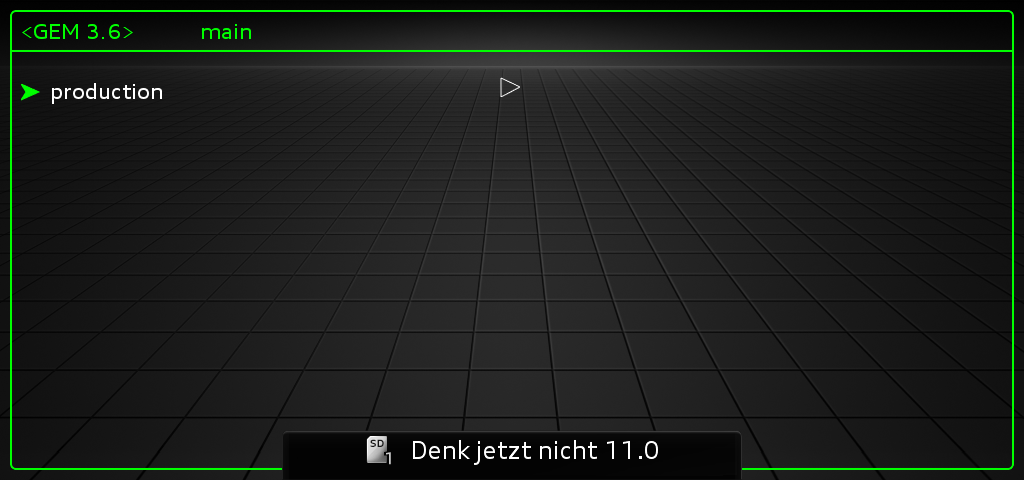
You will need access to the Hidden Green Menu
Go in to Hidden green menu


Scroll down and find SWDL

Go in to this option

and tick that options

Do not reboot your MMI, just exit by clicking nav or phone button.
Go back to the RED ENGINEERING MENU
after that you can follow tutorial and check if BOSE / BANG & OLUFSEN it's unselected for update.
Find BoseG3_Q7 or BoseG3_ or BSG3C7_ANC or BO_Q7 / BO_D4 / BO_C7 / AMP_LC_P / AMPLCPKO (depends of car model you have, always will be starting with BSG/Bose/BO) and take every tick off until there is a letter N near Bose. To do it, you need to enter to this item, and change near all items to N in all second rows. So, finally near Bose should stand N.


This is very important - don’t forget to make it. and click Start download.

You will see a list with all categories that firmware will update scroll to bottom and press “Start update”.


After 30-60 minutes (it depends on what it has to be updated) the firmware update will be done.
Scroll to bottom and press “Continue”. On the next screen select the “Abort documentation” and the MMI will reboot.
Once the system has rebooted, the download application may show a screen that displays the update progress of various devices. As soon as all devices have registered with the upgrade application, the update process is activated, and the progress is shown on the screen.
The system may reboot many times during the update and programming session. This is carried out completely automatically and does not required you to take any action. Once the system has rebooted, updating is continued and the “Download progress” screen is displayed many times.
Device Summary screen will be displayed at the end of the update and will show you if there are any errors. If there are errors (components with NOK) status the “Retry”option will be enabled, select it and retry the failed component update. If all components are with status OK or N/A scroll down and select “Continue”

Because you don’t have connection to Audi SVM you have to “Cancel documentation” here. This is the reason for ECU ERROR CODE: 03276 Please Check Software Version Management in 5F Information Electr.
Google Earth / Audi Connect - has stop working after update.
2020 NOTE: GOOGLE EARTH IS NO LONGER SUPPORTED BY GOOGLE AND AUDI (read more here)
If your car is equipped with SIMCARD slot, and after firmware update Audi Connect / Google earth layer doesn't work, you need to run again update and reinstall GEMMI part. You might also need to re-install script to run green menu.
Make sure you have enabled user defined mode
- Go to Hidden Green Menu,
- Go to SWDL tab
- and tick User Defined
then exit green menu by pressing Media or other button on MMI console.
Go to Engineering Menu and perform update, then select User Defined Mode, and try to find on the list GEMMI, go inside and tick every option in the submenus - Please select just APPLICATION, do not select BOOTLOADER

and perform update. After that your Google Earth / Audi connect will start working again.
Audi RSE - Rear Seat Entertainment - how to update?
If you own an Audi car with RSE (Rear Seat Entertainment) it also has to be updated, the whole procedure looks the same like for main MMI unit, there are just different buttons combination.

And you can follow rest of installation which looks the same as for front MMI unit. Just keep in mind there's a different buttons combinations.

If you don’t have that big SDCARD, you can use any pendrive, but you will need cable MMI -> USB ( you can buy it here) I’m doing like that, and everything works properly! Just make sure to format it as FAT32!

148 comments
Where is can use the fiber optic
Hiya, what you trying to do?
Hi I have gone into engineering menu and it says "Most train version:AU3G" and "MU Software:0524" does it need update? and also how do you come out of the engineering menu?
Hello. What exactly it saying in most train version? https://mmiupdates.com/tutorials/how-to-check-what-mmi-do-i-have-mmi-2g-3g-3g-types-of-audi-navigation-systems/
Can the car be running during the update or does it need to have the engine off?
it can be running, even better for battery :) or you can turn on engine every 20-30 minutes if you do not trust your car battery.
I just want to say that I was able to successfully update my firmware within about 30 minutes thanks to your guide and product. It fixed the bluetooth audio issue I was having as well which is great.
I'm glad to hear that! :)
I want to thank you for your awesome work! I am deeply impressed on what you are doing here! Great work and you made my day! Thanks you!
You very welcome! :)
Hi, I upgrade firmware using User Defined Mode. I noticed that a lot of options weren't checked. Should I check them all manulay to upgrade all system ? (for example bose wasn't checked). Could you explain how to use fibre optic loop ? I should disconnect all bose module and connect loop to optic connector ? Thx for…
Hej Grzegorz, I would suggest to leave it as it is. It mostly selecting by self modules which has to be updated. About bose update don't do it, leave it as NOT SELECTED to update. About optic loop, it should be connected for examply instead of bose amplifier to avoid their update. Im not sure where from you have…
Hello all, 5 days ago I've successfully upgraded FW and Maps on my AUDI Q5 S-Line according this tutorials, but I've realise that after these upgrades "Audi braking guard" and "Audi active lane assist" are not working! Only these two :(, everything else is working without any problems. Can somebody help me? What…
Hi there, sorry to hear that, Can you please create your own thread on our forum here: https://forum.mmiupdates.com/forum/66-firmware-maps/ please attach as much information as you can get. The best if you can get it scanned via VCDS because i believe -that is not a happy coincidence and maybe somewhere else is a…
I've already did it ...
hello Audi experts, I have just brought Audi A6 2009 and the MMI show BBT_EU_K0029_1_D1, and as I can see from the previous discussion that this is MMI radio only, even though I have the DVD unit beside the DVD changer in the glovebox with 2 SD readers and the buttons for sat are in the dashboard and the control…
Hi there, you have got basic radio unit, no chance for sat nav im afraid :(
ohh, so isn't the sat nave is the firmware and the software since I have all the hardware part!
Hi there, i thought i followed the instructions, but only my bleutooth is updated. My current version is RMC_EU_K15028. What can i do to update the softwareversion and not only the bluetooth version?
Hi Albert, so it looks like your MMI was needed only Bluetooth update. MMI i choosing automatically what they need to update. If it's only updated bluetooth then mean there's no any changes in newest firmware than in your current (except bluetooth).
Thank you for your quick reply in this weekend :) I thought the software version in mi MMI would change after the update. So only the bluetooth version changes? Not the firmware version? I see i download another firmware version than is on my MMI.
My wife's car has the Bang and Olufsen stereo, will the "Standard" update affect it, or do I need to perform the "User Defined" update deselecting the Bose files?
I would prefer to check if there's no bang Olufsen firmware update selected in device list. It should be automatically deselected but to be sure and save time and $$ just perform update via user defined mode.
If I have in my car the firmware k0206, do I need to install the latest version (0260) or once a time the 3 versions missed?
In 3G Basic units I would suggest to install first: BNav_EU_K0257_2_D1 and then latest: BNav_EU_K0260_1_D1
Hi.. I downloaded Bundle pack - MMI 3G Plus / HN+R / Middle East maps.. I received two folders for Firmware - part 1 what is the difference between both, and which one should I use to proceed?
Hej, you have to download all files. Part 1 / 2 / 3 /4 /5 etc that's one archive in multiple files. When you get all files, unpack only .001 files.
Thank you! but it still not clear for me I am asking about the firmware only now as I am planing to do firmware update then maps update.. for the firmware I have only two files should I unzip .001 and keep the other one as it is on the sd card because on the tutorials there is only one file to unzip and paste it on…
https://mmiupdates.com/faq/ section: How to copy files on to SDCARD. there's a video as well to help. all files must be downloaded on to computer, from multipack unpack only files with ending .001 and content copy on to sdcard. Please check a link above as there's a video how to do it.
Hi, thanks a lot for your amazing instruction, successfully upgraded my Firmware.. with no faults.. but when it comes to maps I have a problem, I did it step by step as instruction and it takes almost half an hour to the final reboot. But my nav now shows a message “navigation data is not enabled” Plz help on this
Hej, You need to activate the maps https://mmiupdates.com/faq/
I really tired trying to get the activation files in mu purchased bundle pack.. I can’t find any attachments to the maps or firmware under the name activation.. is it 03623 invalid security? Plz let me know where exactly can I reach the activation files Thank you!
Depends on your reply on Email, I don’t really have any files for activation or “license.zip” Can u do me a favor.. send it directly to my email plz.. Thank you
I need maps activation files for my bundle plz.. I believe I don't have it..
Hi Adam, Thank you for your help, and sorry to hear that! Get well soon... I activated the maps once I receive the license files but it stuck on Initializing navigation.. please wait.. Plz tell me what should I do when you are ok.. wishing you speed recovery
Hi. I'm just wondering what is the name of the BOSE folders. Which one should I avoid updating
it's described above, "BoseG3_Q7 or BoseG3_ or BSG3C7_ANC or BO_Q7"
Yes my bad ✋ Thanks
I really cant deselect BoseG3-Q7 folder to avoid the updating... How can i do that to get N i front of the folder name When i go inside the folder there is a few other folders and when i go inside those folders i see Bootloader and application but cant do anything more...
Still have a problem with my maps after activation it stuck on Initializing navigation.. please wait... PLZ HELP!
if i dont have bose audio system, i dont have to worry about checking those boxes in the green menu right?
I have a 2011 US Q7 TDI with 3G High and Bose system. I activated "user defined mode" in the green menu (looks like screenshot in how-to). I'm ready to install the update but when I go to User Defined and go to the BoseG3_Q7, the interface will not let me select or deselect anything. I thought that maybe if I remove…
what does it show in device selection list? Is it Y / N or N/A near BoseG3_Q7?
BoseG3_Q7 has a "S" Inside BoseG3_Q7 BTLDR (3) = Y MAIN (3) = Y FFDB (3) = Y PIC (3) = N DSP1 (3) = Y I cannot change any of them. I also went back to green menu to confirm "user defined mode" is selected.
i see.. let's try on different way. In file metainfo2.txt (on sdcard with firmware) in the root folder remove the line "MetafileChecksum=XXXXXX" and add EnableUserDefinedSWDLMode = "true" skipMetaCRC = "true" and check then.
I found a bunch of Bose entries in the "metainfo2" file inside folder "3" in the SD card. If I delete those entries and delete the Bose folders will that skip updating the Bose so I don't brick it?
it's worth give a try, also remember to put in metainfo2.txt this: EnableUserDefinedSWDLMode = “true” skipMetaCRC = “true” the entry with MetafileChecksum=XXXXXX put a hash to looks like: #MetafileChecksum=XXXXXX otherwise it will show CRC error and will not proceed with update.
The firmware update file doesn't seem to be the same in the tutorials that you have on your site. It is only one RAR file and there is not a zip file. There is also not a large amount of folders as in the screen shot on your site. I have watched the video and understand the process, I just want to make sure the file…
Company is based in Europe and when we starting we only offered firmware and maps for Europe. USA / Canada & Mexico got a different files (different file structure, folders etc etc) but whole procedure it's the same.
Original metainfo2 file had: MetafileChecksum = "060a01e5" I made it look like this: #MetafileChecksum = "060a01e5" EnableUserDefinedSWDLMode = “true” skipMetaCRC = “true” When I tried to load the update I got error: Parsing release info failed. File: Line: 18 Only option was to Abort. Line 18 is…
Sign in or create an account to leave a comment →