How to Code a New Audi Battery with VCDS – BEM Code Guide
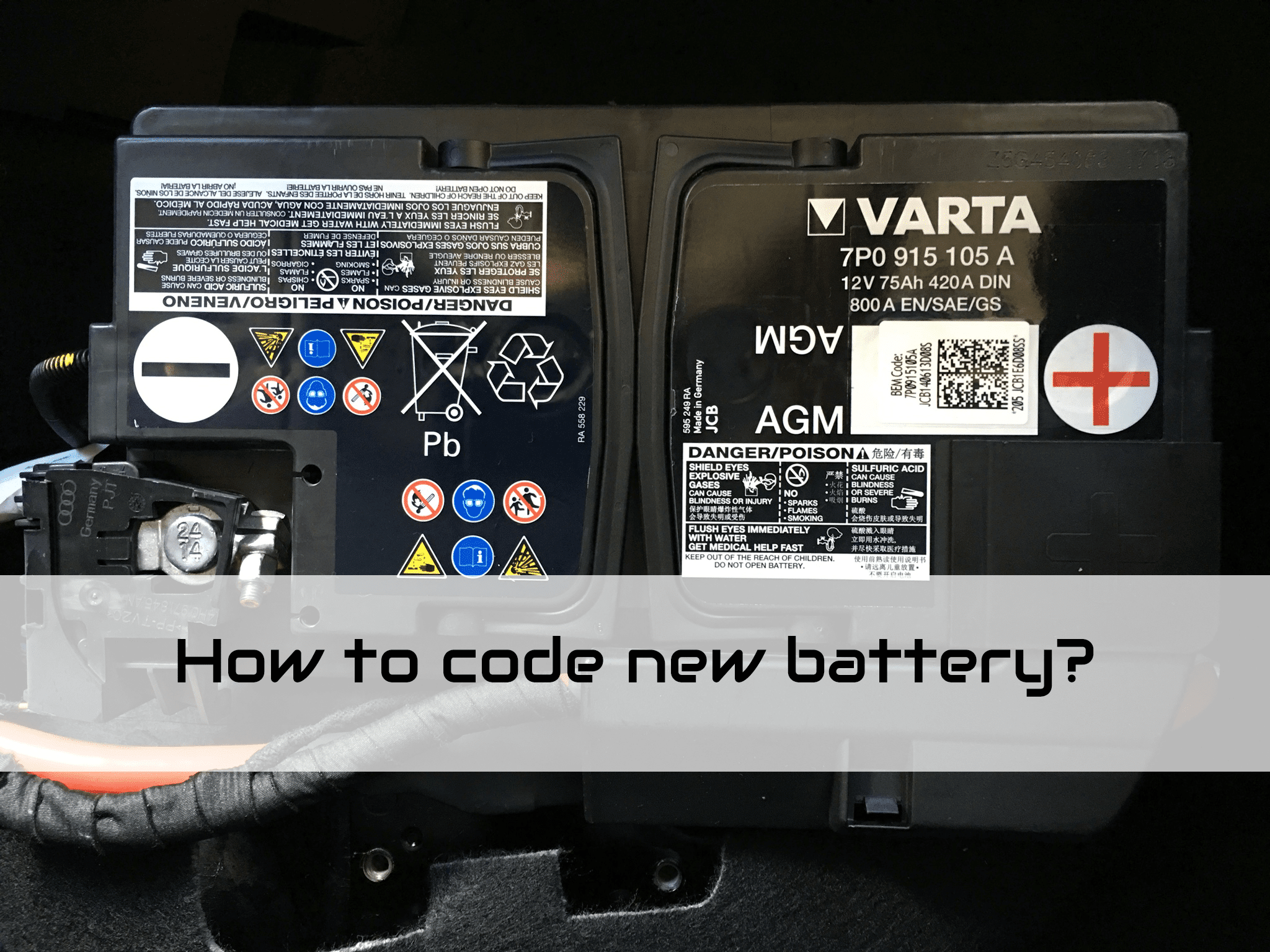
Replacing the battery in an Audi is not always finished when the new battery is physically installed. Many Audi models use an energy management system that monitors battery condition, charging history and electrical consumption.
After installing a replacement battery, the new battery should normally be registered in the vehicle. This allows the energy management system to discard the learned values of the old battery and adapt its charging strategy to the replacement.
The exact VCDS procedure depends on the Audi model, production year and installed control modules. Depending on the vehicle, battery adaptation may be available through:
- 61 – Battery Regulation;
- 19 – CAN Gateway;
- 09 – Central Electrics.
Do not copy a procedure based only on the Audi model. Run a VCDS Auto-Scan first and check which battery adaptation options are actually available in the vehicle.
Does a New Audi Battery Need to Be Coded?
Battery registration is recommended whenever the vehicle has a battery or energy management system.
It is especially important when:
- the replacement battery has a different capacity;
- AGM is being replaced with another battery technology;
- the battery manufacturer or part number has changed;
- the old battery has been installed for several years;
- the vehicle displays energy management or low-battery warnings.
Even when the new battery has the same capacity and technology, registering it tells the vehicle that a fresh battery has been installed. Otherwise, the energy management system may continue using charging history learned from the old battery.
Battery coding does not charge the battery and cannot correct an unsuitable installation. Before starting, confirm that the replacement battery is correctly installed, sufficiently charged and suitable for the vehicle.
What You Need
- Before beginning, prepare:
- stable vehicle voltage during the procedure.
- a compatible VCDS diagnostic interface;
- a laptop with VCDS installed;
- the new battery’s capacity and technology;
- its part number or compatible reference number;
- its three-character manufacturer code;
- a new ten-character serial number;
Understanding the Audi BEM Code
A complete Audi battery identification entry normally contains three separate elements:
- Battery part number
- Manufacturer code
- Battery serial number
For example:
000915105DL VA0 310314E04GThis can be divided into:
Battery part number: 000915105DL
Manufacturer code: VA0
Serial number: 310314E04G
Battery part number
The part number identifies the battery specification or a compatible battery configuration. It is not the battery’s unique serial number.
Manufacturer code
The manufacturer code normally contains three characters. A commonly encountered example is:
VA0Do not confuse the letter O with the number 0.
Battery serial number
The serial number is a separate ten-character value. Its purpose is to identify the battery installation as new.
The battery part numbers listed later in this guide are reference part numbers. They are not serial numbers.

at this case VAO it's a Serial Number, and above VAO you got product number.

Method 1: Battery Coding Through Module 61
This method is commonly found in older Audi vehicles equipped with a separate Battery Regulation controller.
- Connect VCDS and switch on the ignition.
- Select:
61 – Battery Regulation- Open:
Coding – 07- Start:
Battery Coding Assistant- Enter the new battery information:
Battery part number
Battery serial number
Battery manufacturer
- Confirm the values.
- Select:
Do It!- Close the controller and confirm that no new fault codes have appeared.
Method 2: Battery Adaptation Through Module 19
Some Audi vehicles store battery information in the CAN Gateway rather than in a separate module 61.
- Connect VCDS and switch on the ignition.
- Select:
19 – CAN Gateway- Open:
Adaptation – 10- Look for a channel named similarly to:
Battery information
Battery replacement
Battery adaptation
On some older controllers, this may appear as adaptation channel 4.
- Read and save the existing value before changing anything.
- Enter the new part number, manufacturer code and serial number in the format required by the controller.
- Save the adaptation.
- Switch the ignition off, wait briefly and switch it on again.
- Scan the vehicle for fault codes.
The exact channel name and entry format vary between controller generations. Do not overwrite the original value until you have saved a copy.
Method 3: UDS Battery Adaptation
Newer Audi platforms may present battery data as separate adaptation fields rather than one combined BEM string.
Depending on the controller, VCDS may display fields such as:
Rated battery capacity
Battery technology
Battery manufacturer
Battery serial number
Enter the actual specification of the replacement battery. Do not select AGM, EFB or conventional lead-acid technology based only on capacity.
If the replacement has the same capacity and technology as the previous battery, changing the serial number is often enough to register it as a new installation. If its specification is different, the relevant capacity and technology fields must also be updated.
Audi Battery Part Number Reference List
The following values are common Audi/VAG battery part-number references. They can help identify a compatible capacity, but they are not universal for every model and must not be used as serial numbers.
51Ah - 8K0915105J / 00915105BB / 00915105DC
60Ah - 4F0915105 / 8K0915105G / 00915105DD
61Ah - 8K0915105H / 00915105AD / 00915105DE
70Ah - 4F0915105A / 8K0915105C / 00915105DF
72Ah - 8K0915105B / 00915105AF / 00915105DG
80Ah - 4F0915105B / 8K0915105D / 00915105AG / 4FD915105 / 8KD915105 / 00915105DH
95Ah - 4F0915105C / 8K0915105E / 00915105AH / 00915105DK
110Ah - 4F0915105D / 8K0915105F / 00915105AK / 8KD915105A / 00915105DL
68Ah - (AGM) 7L0915105 / 00915105CC
75Ah - (AGM) 3D0915105H / 00915105CD
92Ah - (AGM) 4F0915105E / 00915105CE
105Ah - (AGM) 4L0915105 / 00915105CF
115Ah - 4H0915105 / 00915105DM
Part number / Serial number
Use this list only as a reference. Confirm battery capacity, dimensions, terminal arrangement, technology and vehicle compatibility before installation.
What If the New Battery Has No BEM Code?
Many aftermarket batteries do not include a complete Audi-style BEM code.
In that situation:
- Match the correct battery capacity and technology.
- Use a compatible part-number reference for that battery specification.
- Select the correct manufacturer code when known.
- Enter a new ten-character serial number accepted by the controller.
Do not reuse the complete old entry without changing anything. If all identification values remain identical, the vehicle may not recognize that a new battery has been installed.
Common Battery Coding Mistakes
Using a part number as the serial number
Values such as:
000915105DLare part numbers, not unique battery serial numbers.
Selecting the wrong battery technology
An AGM battery must not be coded as a conventional flooded battery simply because both have the same Ah rating.
Changing random values until VCDS accepts them
An accepted adaptation does not automatically mean the battery specification is correct.
Forgetting to save the original coding
Always record the original adaptation value before making changes.
Assuming every Audi uses module 61
Many vehicles use module 19, while other platforms may place battery adaptation in module 09.
Coding an insufficiently charged battery
Battery registration does not replace charging. A deeply discharged replacement battery should be properly charged and tested.
What Happens If an Audi Battery Is Not Coded?
The car will often still start and operate, but the energy management system may continue using the aging history of the previous battery.
Possible consequences include:
- inaccurate battery condition calculations;
- inappropriate charging strategy;
- premature energy-saving interventions;
- battery-related warnings;
- reduced service life of the replacement battery.
The exact behaviour depends on the Audi model and energy management system.
Frequently Asked Questions
Can I install a battery with a different capacity?
Sometimes, but the replacement must be suitable for the vehicle. If capacity or technology changes, update all corresponding adaptation values.
Can I replace AGM with a conventional battery?
Only if that battery type is approved for the vehicle. Cars equipped with start-stop or high electrical demand may require AGM or EFB technology.
Can I reuse the old BEM code?
If the replacement has the same specification, parts of the previous entry may remain appropriate. However, the serial number should be changed so that the system recognizes a new battery installation.
Why can’t I find module 61?
Your vehicle may store battery adaptation in:
19 – CAN Gatewayor:
09 – Central Electrics
Run an Auto-Scan and inspect the installed modules.
Do I need to clear fault codes afterwards?
Run a complete scan after registration. Clear faults only after saving the original scan and confirming that they were caused by the battery replacement or temporary voltage interruption.
Final Check
After coding the battery:
- Confirm that VCDS accepted the new adaptation.
- Cycle the ignition.
- Run another Auto-Scan.
- Check for battery management or low-voltage faults.
- Verify that the vehicle starts and charges normally.
Battery adaptation should always match the actual battery installed in the vehicle. When uncertain, use the factory battery specification or obtain guidance based on the vehicle’s VIN, current adaptation values and complete VCDS Auto-Scan.


5 comments
The battery serial number in that YouTube video is completely wrong (000915105A - this is the part number, not the serial number). Also the list of Part Numbers at the bottom of the page (for battery sizes 51h to 115Ah), are all Part Numbers only. These are NOT serial numbers (as you have highlighted in blue). Look…
hi adam, my garage installed the 364050 eurorepar last june but it was never coded, now i notice it's not synced with the MMI battery level, can you advice what code i should enter in 19 vcds long adaption? see attached pics of my vcds: https://photos.app.goo.gl/vmDMpshGK4NpQgGp9
Hi, do not see BEM code in your battery stickers.. so i suggest to choose 110Ah from the list above, and try to code it.
Hello I'm see your video how coding new battery varta for audi .. I have look this list but your list missing one battery number . You have battery 95ah and next one it's 110ah. My battery warta it's 100ah so what code I can put in for coding ?
Hi, if its warta it should have BEM codes on their stickers, does it have, have you checked?
Sign in or create an account to leave a comment →