How to Check Audi DPF Data and Regeneration with Android
If you drive an Audi diesel mainly on short urban journeys, the diesel particulate filter may begin regeneration at the least convenient moment—often just as you reach your destination.
I experienced this with my Audi A4 B8.5 Avant 2.0 TDI. When I previously drove approximately 40 miles each way to work, DPF regeneration was rarely noticeable. After switching to mostly city driving, active regeneration became much more frequent and often started shortly before I arrived home.
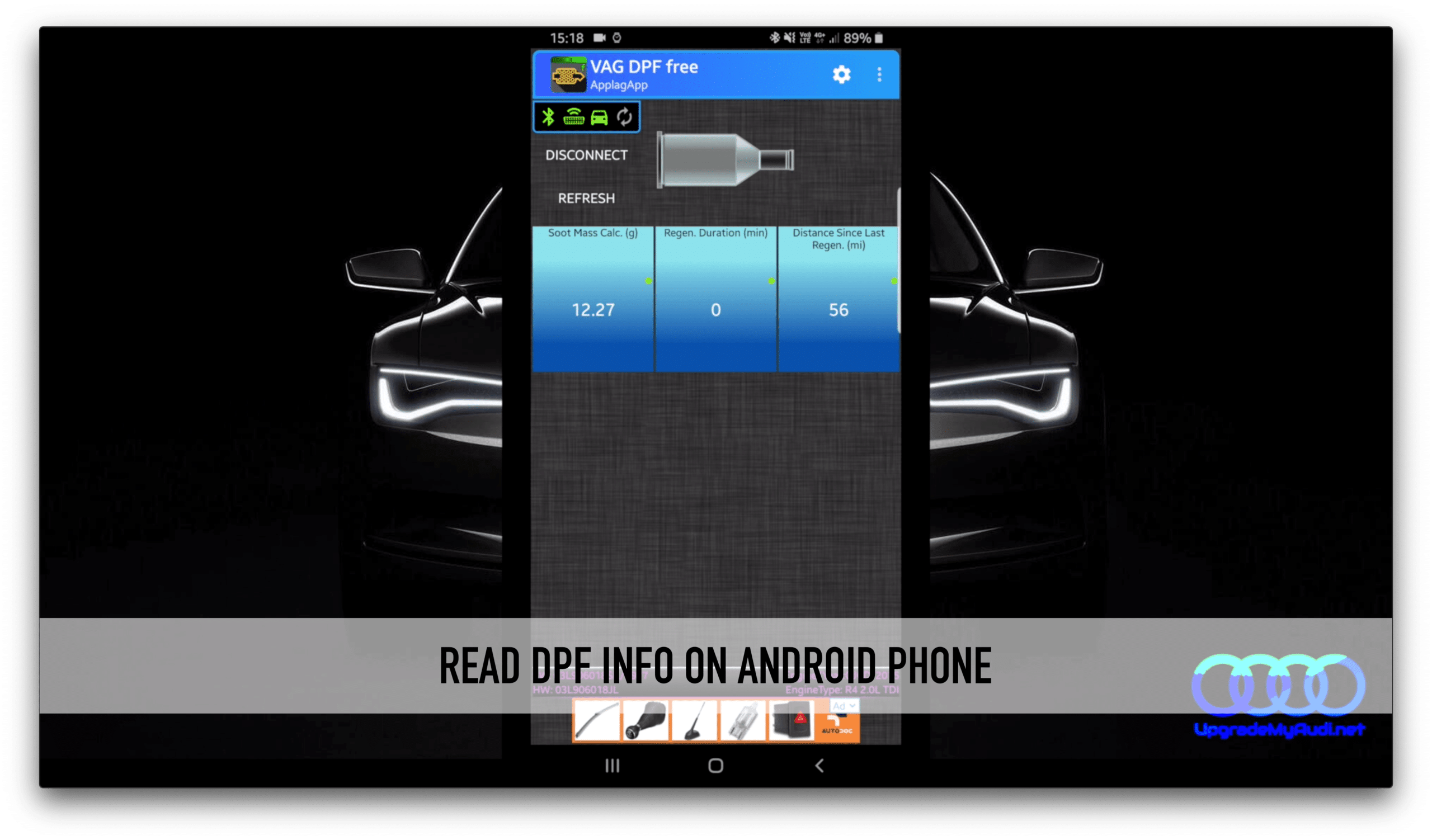
To understand what was happening, I started monitoring the DPF using an Android phone, a compatible Bluetooth OBD2 adapter and the VAG DPF application.
This setup does not repair or clean the filter, but it can show useful information about its condition and help you recognise when an active regeneration is in progress.
What You Need
To read DPF information, you need:
- a compatible Audi, Volkswagen, Škoda or SEAT diesel,
- a supported engine control unit,
- an Android phone or tablet,
- a compatible Bluetooth OBD2 adapter,
- the VAG DPF application.
This method is designed for supported Volkswagen Group diesel engines. It should not be described as compatible with every car fitted with a DPF.
The parameters available depend on the engine, ECU, application version and diagnostic adapter.
What Can the VAG DPF App Display?
Depending on compatibility, the application may display information such as:
- calculated soot mass,
- measured soot mass,
- oil ash residue,
- exhaust gas temperatures,
- distance or time since the previous regeneration,
- current regeneration status,
- regeneration duration,
- DPF differential pressure,
- kilometres travelled with the filter,
- regeneration progress.
Not every engine reports every parameter. A missing value does not automatically indicate a damaged sensor or filter.
How to Connect the OBD2 Adapter
- Park the vehicle safely.
- Switch the ignition off.
- Locate the vehicle’s OBD2 diagnostic socket.
- Insert the Bluetooth OBD2 adapter.
- Switch the ignition on.
- Unlock the Android phone.
- Open the phone’s Bluetooth settings.
- Search for nearby devices.
- Select the OBD2 adapter.
- Enter the pairing PIN supplied with the adapter if requested.
Common generic adapters sometimes use codes such as 1234 or 0000, but use the instructions supplied with your specific interface rather than assuming a code.
How to Configure the VAG DPF Application
After pairing the interface:
- Open the VAG DPF application.
- Open the connection or preferences menu.
- Select Bluetooth as the connection type.
- Choose the paired OBD2 adapter.
- Select the appropriate engine group or ECU profile.
- Switch the ignition on if it is not already active.
- Start the connection.
- Wait for live DPF parameters to appear.
Selecting the correct engine profile is important. A connection may fail or display incomplete data when the selected profile does not match the engine control unit.
How to Recognise Active DPF Regeneration
The app may explicitly display an active regeneration status. You may also notice several parameters changing together, including:
- increasing exhaust gas temperature,
- soot mass decreasing,
- elevated idle speed,
- higher instantaneous fuel consumption,
- cooling fans operating,
- start/stop becoming unavailable,
- a different engine sound,
- regeneration progress increasing.
These signs vary between vehicles. Do not diagnose DPF regeneration from one parameter alone.
In my Audi A4 B8.5, a complete regeneration would often take approximately 20 minutes, but this is only an example from one vehicle. The actual duration depends on engine load, temperature, traffic, soot level and driving conditions.
What Do Calculated and Measured Soot Mass Mean?
The ECU may provide more than one soot value.
Calculated soot mass
This is estimated by the engine control unit using operating conditions such as fuel consumption, mileage, exhaust temperature and previous regeneration data.
Measured soot mass
This value may be derived from sensor information, including pressure difference across the DPF.
The two readings do not always match exactly. Their behaviour over time is generally more useful than comparing a single reading with a value from another vehicle.
Soot and Ash Are Not the Same
Soot is combustible material that can be reduced during a successful regeneration.
Ash is non-combustible residue that accumulates over the life of the filter. Normal regeneration does not remove accumulated ash.
Therefore:
- a regeneration can reduce soot,
- regeneration does not reset the physical ash content,
- a filter with high ash loading may eventually require professional assessment, cleaning or replacement.
Do not treat the soot and ash values as interchangeable.
Does the App Start DPF Regeneration?
Monitoring applications are primarily used to read data. They should not be assumed to start a forced regeneration unless that function is explicitly supported for the exact engine and application.
A forced or workshop regeneration involves high exhaust temperatures and must not be started casually. It may be unsafe when:
- fault codes are present,
- fuel or oil levels are unsuitable,
- the DPF is excessively loaded,
- exhaust components are damaged,
- the vehicle is parked near combustible material,
- or the manufacturer’s required conditions are not met.
Use appropriate diagnostic procedures for forced regeneration.
What to Do When Regeneration Starts
The application can help you recognise an active regeneration, but it does not replace the instructions for the vehicle.
If it is safe and practical, avoid switching the engine off immediately after regeneration begins. Continue normal driving in suitable conditions and allow the vehicle to complete the process.
Do not:
- exceed speed limits,
- interact with the phone while driving,
- park over dry grass or combustible material,
- hold the engine at an arbitrary RPM based on a generic online guide,
- repeatedly force regeneration without diagnosing the cause.
Mount the phone securely and configure the application before moving. A passenger should operate it if interaction is required.
Why Does DPF Regeneration Happen Frequently?
Frequent regeneration may be associated with:
- repeated short journeys,
- low exhaust temperature,
- interrupted regeneration cycles,
- a faulty differential-pressure sensor,
- temperature-sensor faults,
- EGR problems,
- thermostat or coolant-temperature problems,
- injector or combustion issues,
- excessive soot production,
- high ash loading,
- unsuitable engine oil,
- or stored engine fault codes.
The application can provide useful evidence, but live values alone do not identify every cause.
If regeneration occurs unusually often, perform a complete diagnostic scan rather than continuing to monitor the symptom indefinitely.
App Does Not Connect to the Car
Check the following:
- Confirm that the adapter is fully inserted.
- Switch the ignition on.
- Make sure the adapter is paired with Android.
- Select the correct Bluetooth device in the application.
- Check that another diagnostic app is not using the adapter.
- Select the correct engine group.
- Confirm that the engine is supported.
- Restart Bluetooth and reconnect.
- Test with another compatible adapter if possible.
Very cheap generic adapters can report basic OBD information but fail when an application requests manufacturer-specific data.
Incorrect or Missing DPF Values
If the app connects but some fields remain empty:
- verify the selected engine profile,
- check whether that ECU reports the parameter,
- update the application,
- reconnect with the engine running where safe,
- check for ECU communication faults,
- test another supported adapter.
Do not interpret a missing field as proof that the DPF has been removed or that a sensor has failed.
Important Limitations
The displayed information is diagnostic data, not a guarantee of DPF condition.
A healthy-looking soot value does not rule out:
- physical filter damage,
- incorrect sensor readings,
- excessive ash,
- exhaust leaks,
- ECU faults,
- previous software modifications.
If the DPF warning light remains on, the vehicle enters limp mode or regeneration repeatedly fails, obtain a complete diagnostic scan and investigate the cause.
Removing or disabling emissions equipment may be illegal and can cause inspection, emissions and vehicle-operation problems.

0 comments
Sign in or create an account to leave a comment →